A Markdown editor
with Git built in.
Your notes live in a repo. Your editor should know that — without turning writing into software engineering.
The two-window problem
If your Markdown lives in Git today, you're probably running two tools: a nice
editor that has never heard of version control, and a terminal (or a code editor)
for the status → diff → add → commit → push dance. Beautiful editors
treat Git as someone else's problem; Git tools treat your prose like code.
bare is the single window: a calm, native Mac editor where the Git loop — changes, diff, commit, push, pull — sits quietly in the margin of your writing.
The whole loop,
in the margin.
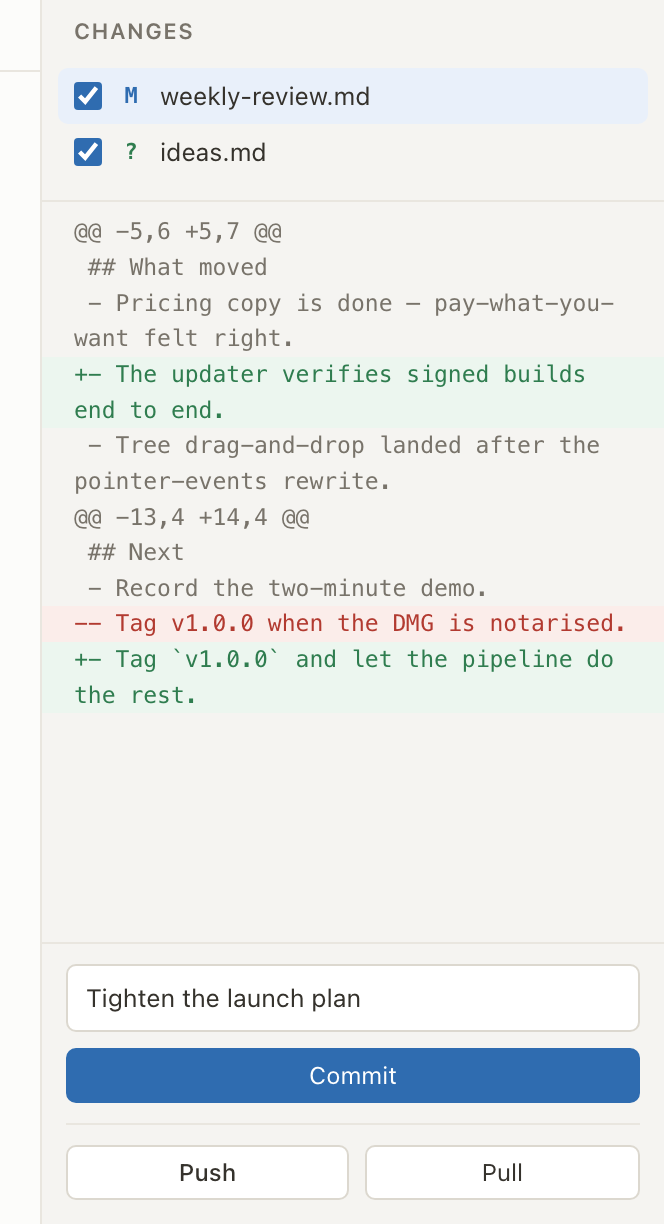
Save a file and it appears in the Changes pane. Read the unified diff — exactly what changed, line by line. Tick the files that belong together, write a message, and commit. Push and Pull are one click each, with ahead/behind counts in the header so you always know where you stand.
- Changes appear as you save — bare watches the folder, no refresh button.
- Every commit is deliberate: your files, your message, your click.
- Pull is fast-forward-only — bare never merges on your behalf.
What bare will never do to your repo
Small promises, kept forever. bare:
- Never runs a blanket
git add -A— you tick exactly the files each commit includes. - Never force-pushes and never rewrites history.
- Never auto-commits, auto-pulls, or auto-merges — nothing happens without you.
- Stops instead of guessing: if a pull isn't a fast-forward, bare tells you plainly and leaves the resolution to the tools you already trust.
Your Git setup, untouched
bare doesn't bundle its own Git — it drives the git already on your
Mac. That one decision means everything you've configured keeps working, unchanged:
SSH keys, credential helpers, commit hooks, signing, remotes — GitHub, GitLab,
Codeberg, self-hosted, anything. There's no separate sign-in, no OAuth dance, and
no second copy of your credentials. If it works in your terminal, it works in bare.
Three steps, no terminal
-
1
Edit and save
Open any Git-backed folder. Write in rendered view or source (
⌘E). Saved changes appear in the Changes pane by themselves. -
2
Read the diff
A unified diff per file shows exactly what changed — yours, or what an agent or collaborator left behind.
-
3
Commit and sync
Tick the files that belong together, write the message, Commit. Then Push — or Pull, fast-forward-only, when the remote has news.
Questions people ask
Do I need to set anything up to use Git in bare?
No. If git works in your terminal, bare works. Open a Git-backed folder and the Changes pane is live — no sign-in, no tokens, no plugin, no configuration.
What happens when a pull isn't a fast-forward?
bare stops and says so, plainly. It never merges or rebases on your behalf. Resolve the divergence however you usually do — terminal, VS Code, a Git client — then carry on in bare.
Can I keep using the terminal and other Git tools alongside bare?
Yes. bare doesn't own the repository — it's plain Git underneath. Commit in bare, rebase in the terminal, browse history in your Git client; nothing conflicts.
Does bare work with GitHub, GitLab and self-hosted remotes?
Yes — anything your git can reach, bare can push to and pull from, because it runs your own git with your own SSH keys and credential helpers.
Try it on a real repo.
Download free, open a Git-backed folder of Markdown, and make your first commit without the terminal.
Download free for macOSReading more than writing? Markdown viewer for Mac · Reviewing agent output? Review AI-written Markdown · How bare compares